How Grayscale Enhances Dark Scenes on LED Display Solutions?
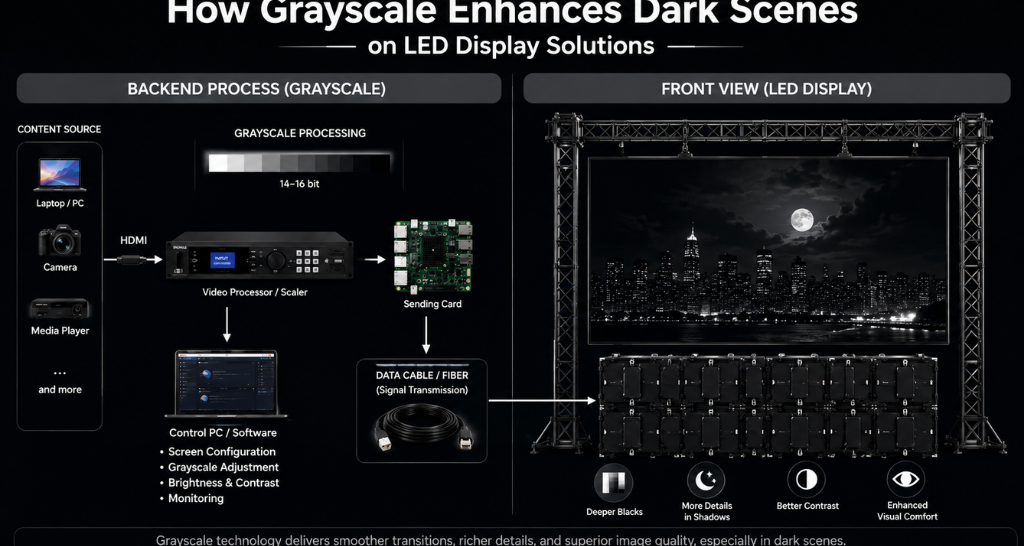
Dark scenes can reveal the real quality of an LED screen. Bright colours and high-contrast graphics may look impressive on almost any capable display, but a dark movie scene, a dimly lit presentation, or a night-time visual can quickly expose problems such as crushed blacks, visible colour steps, flicker, banding, or uneven brightness. This is why grayscale performance matters when evaluating LED Display Solutions.
Grayscale is one of the less visible specifications on a product sheet, yet it has a direct impact on how smoothly a display reproduces shades between black and white. A display with strong grayscale processing can preserve subtle details in shadows while keeping highlights controlled. In practical terms, that means dark scenes can look deeper, more natural, and more detailed instead of appearing like a flat black area.
What Is Grayscale?
Grayscale refers to the number of distinct brightness levels a display can reproduce between its darkest and brightest states. In digital LED systems, grayscale is commonly expressed in bits. More bits allow a system to represent more tonal levels.
For example, an 8-bit system can represent 256 levels per channel, while a 16-bit system can represent 65,536 levels per channel. A higher theoretical grayscale capability does not automatically guarantee a better picture, because the entire signal chain must process and reproduce those levels accurately.
This is where LED Display Solutions need to be evaluated as complete systems rather than by a single specification. The receiving card, sending card, video processor, LED driver ICs, calibration, firmware, and display modules all influence the final image.
Why Do Dark Scenes Need Better Grayscale?
Dark content contains many subtle transitions. A black jacket may contain folds that are only slightly brighter than the surrounding shadow. A night sky may contain gradients that move from almost black to dark blue. A dimly lit auditorium may contain faces, walls, and objects that sit within a narrow brightness range.
If a display cannot reproduce these small differences smoothly, several visual problems can appear:
- Shadow details disappear.
- Dark gradients become visible steps.
- Black areas may look crushed.
- Colours can shift in low brightness.
- The image may look noisy or unnatural.
- Low-brightness content can lose depth.
Good LED Display Solutions maintain these transitions more accurately, allowing viewers to distinguish objects that would otherwise blend into the background.
How Does Grayscale Processing Work?
When a source sends video to an LED display, the content contains digital information describing brightness and colour. The display processing chain interprets this information and converts it into signals that control individual LED pixels.
A simplified signal path looks like this:
Content Source → HDMI/Display Interface → Video Processor → Sending Card → Receiving Card → LED Driver IC → LED Modules
At each stage, the system must preserve the information contained in the original signal. If processing introduces errors, the display may lose subtle tonal differences before the image reaches the LED modules.
This is why LED Display Solutions with high-quality processing can produce smoother shadow transitions even when two screens use similar LED modules.
The Role of LED Driver ICs:
LED driver ICs control the current delivered to individual LEDs and help determine how accurately brightness levels are reproduced. Their performance becomes particularly important when displaying low-brightness content.
Poor driver performance or unsuitable configuration can contribute to uneven brightness, colour inconsistency, or visible transitions in dark areas. High-quality components and appropriate calibration help the display reproduce subtle changes more consistently.
For LED Display Solutions, driver IC selection should therefore be considered alongside pixel pitch, refresh rate, brightness, contrast, and grayscale capability.
Grayscale vs Brightness: What Is the Difference?
Brightness and grayscale are related, but they are not the same thing.
Brightness describes how much light the display can produce. Grayscale describes how many tonal steps the system can reproduce between dark and bright states.
A screen can have very high brightness and still perform poorly in dark scenes if its low-level grayscale reproduction is weak. Conversely, a display designed for controlled indoor viewing may not need extreme brightness but can still produce excellent shadow detail.
This distinction is especially important when comparing LED Display Solutions for different environments.
Why Black Levels Matter?
Black level refers to how dark the display can appear when showing black content. In an ideal display, black areas should look deep without sacrificing nearby shadow details.
However, LED technology does not behave exactly like an emissive display with independently controlled pixels in every scenario. The perceived black level can be affected by ambient light, LED package characteristics, cabinet design, processing, calibration, and content.
For this reason, a strong LED Display Solutions design considers both black reproduction and grayscale detail. Simply reducing brightness to make blacks appear darker can cause shadow information to disappear.
What Causes Banding in Dark Scenes?
Banding occurs when a smooth tonal transition appears as visible steps. Imagine a video showing a dark blue sky gradually becoming black. If the system cannot reproduce enough intermediate values, you may see distinct bands instead of a smooth gradient.
Banding can result from several factors:
- Limited source content.
- Low bit-depth processing.
- Poor signal conversion.
- Incorrect video processor settings.
- Driver limitations.
- Inadequate calibration.
- Compression or processing inside the content workflow.
Good LED Display Solutions reduce the risk of visible banding by maintaining adequate signal precision throughout the processing chain.
Why Calibration Matters?
Even a high-specification LED wall can produce inconsistent visuals if it is poorly calibrated. Calibration helps balance brightness and colour output across modules so that the complete screen behaves more uniformly.
For dark scenes, calibration becomes especially important because small variations can become noticeable when the overall brightness is low.
Calibration can involve:
- Brightness uniformity adjustment
- Colour correction
- Module-level compensation
- Pixel-level correction
- Low-brightness tuning
- White-balance adjustment
Professional LED Display Solutions should include calibration as part of commissioning rather than treating it as an optional finishing step.
Indoor vs Outdoor Grayscale Performance:
The environment in which a display operates changes how grayscale performance is perceived.
For an [Indoor LED Display], viewers are often closer to the screen and ambient lighting can be controlled more carefully. Fine tonal transitions are therefore easier to notice. Applications such as boardrooms, control rooms, auditoriums, retail spaces, museums, and corporate environments may benefit from fine pixel pitches and accurate low-brightness reproduction. Lightomated’s indoor display range includes configurations designed for close-range viewing and high-resolution visual content. Indoor LED Display
Outdoor installations have different priorities. An [Outdoor LED Display] must remain visible under changing ambient light, including direct sunlight. Higher brightness, weather protection, viewing distance, and cabinet construction become major considerations. Grayscale still matters, especially for video and rich visual content, but the display must balance tonal reproduction with sufficient brightness for the environment. Outdoor LED Display
How Pixel Pitch Influences Dark Scene Quality?
Pixel pitch is the distance between the centres of two adjacent pixels. A smaller pixel pitch generally provides higher pixel density and is often selected for closer viewing distances.
However, smaller pixel pitch alone does not guarantee better grayscale performance. Two displays with similar pixel pitch can produce different results because of differences in processing, LED packages, driver ICs, calibration, and system design.
When selecting LED Display Solutions, pixel pitch should therefore be considered together with grayscale, contrast, brightness, refresh rate, viewing distance, and content type.
The Importance of Contrast:
Contrast describes the difference between the darkest and brightest portions of an image. Strong contrast helps an LED display create visual depth, but contrast figures should not be considered in isolation.
A display may advertise a high contrast ratio, yet poor low-level processing can still make dark content appear flat. In real-world applications, perceived contrast depends on the LED modules, processing, ambient light, calibration, and the content itself.
This is why LED Display Solutions should be evaluated using actual content demonstrations rather than specifications alone.
Why Refresh Rate Also Matters?
Refresh rate is often discussed in relation to camera capture, motion, and flicker. It can also influence how comfortable a display looks when showing moving content or when recorded on camera.
A high refresh rate does not directly create better grayscale, but it can contribute to smoother visual performance when combined with appropriate processing and driver technology.
For professional LED Display Solutions, refresh rate, grayscale, scan mode, driver ICs, and processing should be evaluated as a complete package.
How HDMI Content Reaches an LED Display?
HDMI is often the starting point for content delivery in professional display environments. A media player, laptop, camera system, or other source sends a digital video signal to a processor or controller.
The processor may scale, switch, format, or otherwise process the signal before passing it to the sending card. The sending card distributes the processed information to receiving cards, which then communicate with the LED modules.
At this stage, the system must preserve brightness and colour information accurately. If the source signal, processor configuration, colour space, bit depth, or scaling settings are incorrect, dark scenes may lose detail.
This is where AV Integration becomes valuable in larger deployments. A professionally integrated system considers the source, signal routing, processors, displays, control systems, networking, and user requirements together rather than treating the LED wall as an isolated device. AV Integration
Common Grayscale Problems and Their Causes:
Problem: Dark areas look completely black.
Possible cause: Shadow detail is being crushed by processing, brightness settings, or source content.
Problem: A dark gradient appears in visible steps.
Possible cause: Insufficient tonal resolution, signal processing limitations, or compression.
Problem: One section of the screen looks darker.
Possible cause: Module variation, calibration issues, or hardware inconsistency.
Problem: Dark colours appear different across the wall.
Possible cause: Colour calibration or module uniformity problems.
Problem: The screen looks good in bright content but poor in movies.
Possible cause: The system may be optimised for high-brightness graphics rather than low-level video reproduction.
For LED Display Solutions, testing should therefore include real video content instead of only colourful promotional graphics.
How to Test Grayscale Before Buying an LED Display?
A proper demonstration can reveal more than a specification sheet. Ask the supplier to show:
- A black-to-white grayscale ramp.
- Dark movie scenes.
- Night-time city footage.
- Dark blue and dark red gradients.
- Shadow-heavy camera footage.
- Low-brightness skin tones.
- Fine-detail content at the intended viewing distance.
Observe whether the screen maintains details in dark areas, whether gradients appear smooth, and whether different sections of the wall look consistent.
For LED Display Solutions, also ask about the driver IC, receiving card, video processor, calibration process, refresh rate, pixel pitch, brightness range, and maintenance approach.
Grayscale and Content Quality Go Hand in Hand:
Even the best display cannot recover information that does not exist in the source. If a video is heavily compressed or has crushed blacks, the LED wall cannot recreate the missing detail.
Content creation should therefore preserve sufficient bit depth and dynamic range. The playback device and video processor should also be configured correctly.
This becomes particularly important in professional environments where LED Display Solutions are used for presentations, broadcast feeds, digital signage, immersive experiences, or cinematic content.
Choosing the Right LED Display for Your Application:
There is no single specification that makes one display perfect for every application. The right choice depends on viewing distance, screen size, ambient light, content type, operating hours, maintenance access, and integration requirements.
For indoor applications, priorities may include fine pixel pitch, accurate colour reproduction, low-brightness detail, and seamless appearance. For outdoor applications, brightness, weather resistance, structural design, and visibility may receive greater emphasis.
A good LED Display Solutions provider should evaluate the complete application before recommending a configuration.
How Lightomated Helps?
Lightomated helps businesses choose and implement LED display solutions based on their application, viewing distance, environment, content requirements, and visual performance needs. From indoor LED displays for corporate spaces and auditoriums to outdoor LED displays for high-visibility applications, the focus is on delivering consistent brightness, accurate colour reproduction, and smooth grayscale performance.
The team can also help with display selection, configuration, installation, calibration, and ongoing support to ensure the LED display performs reliably in real-world conditions.