From Source to Screen: How HDMI Delivers Content to LED Display Solutions?
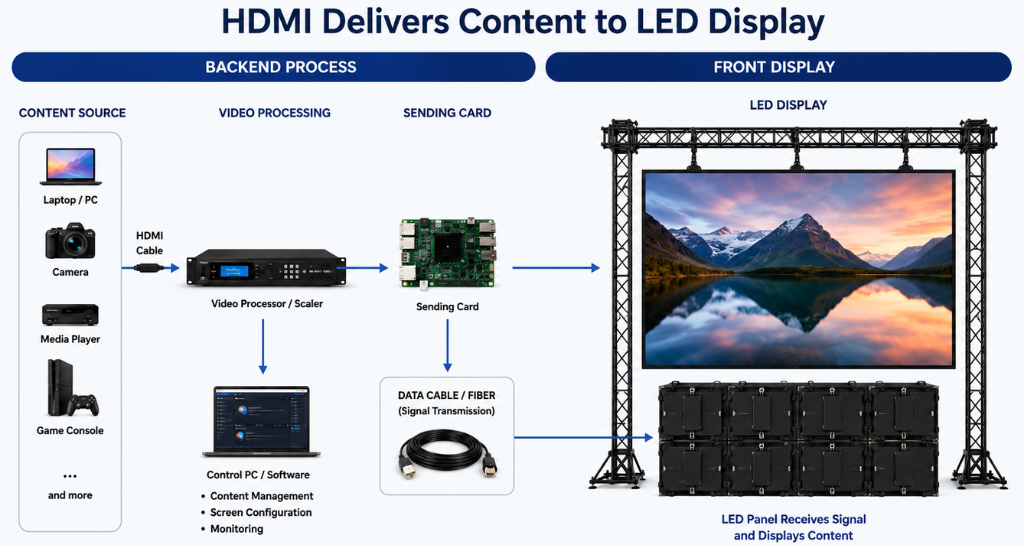
When you see a presentation, advertisement, live event feed, or high-resolution video playing on a large LED screen, it may look like the content simply appears on the display. In reality, several components work together to take the signal from a source device and deliver it accurately to the LED screen.
At the center of many of these setups is HDMI, a widely used interface for transmitting high-quality digital video and audio. From laptops and media players to cameras and control systems, HDMI can play an important role in moving content from its source to the display system.
For businesses, event venues, retail stores, auditoriums, control rooms, and corporate environments, understanding this signal journey is useful when planning reliable LED Display Solutions.
In this guide, we will explain how HDMI works, how content travels from a source to an LED display, what components are involved, common HDMI challenges, and how professional LED Display Solutions can improve performance and reliability.
What Is HDMI?
HDMI stands for High-Definition Multimedia Interface. It is a digital interface designed to transmit video and audio through a single cable.
Unlike older analog connections, HDMI carries digital signals. This allows compatible devices to transmit high-quality content without converting the signal into an analog format.
A typical HDMI connection may involve:
Source Device → HDMI Cable → Processor/Scaler → Sending Card → LED Cabinets → LED Modules
Depending on the installation, additional devices such as switchers, splitters, extenders, converters, or video processors may be included.
This makes HDMI an important part of many LED Display Solutions, especially when the display needs to show content from computers, media players, cameras, or other HDMI-compatible devices.
How Does HDMI Deliver Content to an LED Display?
The content delivery process can be divided into several stages.
1. Content Starts at the Source
Everything begins with a source device.
The source could be:
- Laptop
- Desktop computer
- Media player
- Camera
- Set-top box
- Digital signage player
- Video conferencing system
- Streaming device
- Control room workstation
For example, when a laptop plays a 4K promotional video, the laptop generates the digital video signal and sends it through its HDMI output.
The source determines important parameters such as:
- Resolution
- Refresh rate
- Color format
- Frame rate
- Audio format
A properly configured source is the first requirement for reliable LED Display Solutions.
2. HDMI Transmits the Digital Signal
Once the content is generated, the HDMI cable carries the digital signal from the source to the next device in the signal chain.
The cable transmits video and, where supported, audio information. HDMI also carries control and identification information between compatible devices.
This communication helps connected equipment understand what type of signal is being received.
For example, a source may send:
3840 × 2160 at 60 Hz
The receiving device needs to recognize this signal and determine whether it can process and display it correctly.
For professional LED Display Solutions, selecting the appropriate HDMI version, cable quality, and compatible equipment is important because signal requirements can vary depending on resolution and refresh rate.
3. The Video Processor Handles the Signal
An LED display does not usually work like a conventional television where an HDMI cable connects directly to the screen.
Large LED displays are made from multiple cabinets and modules. Therefore, the incoming HDMI signal generally needs to be processed before it reaches the LED panels.
This is where a video processor or controller becomes important.
The processor can perform functions such as:
- Scaling
- Switching
- Signal conversion
- Resolution management
- Image cropping
- Multi-source management
- Picture adjustment
- Display configuration
For example, a laptop may output a 1920 × 1080 signal while the LED display has a different native resolution.
The processor can scale the incoming content so it fits the LED display correctly.
This processing stage is a critical part of professional LED Display Solutions, particularly for large-format displays with complex layouts.
4. Sending Card Converts the Processed Content
After processing, the signal may be passed to a sending card.
The sending card prepares the processed image data for transmission to the LED receiving system.
It divides the image information into the appropriate data structure required by the LED display system.
Depending on the architecture, the sending card can connect with receiving cards installed within LED cabinets.
This process allows a large display to receive and distribute content across multiple cabinets.
In large LED Display Solutions, this architecture makes it possible to control a display consisting of hundreds or even thousands of LED modules.
5. Receiving Cards Distribute the Data
Receiving cards are generally installed inside LED cabinets.
Their role is to receive the processed display data and distribute it to the LED modules.
A large LED screen is not one single display surface. It consists of multiple modules and cabinets working together.
The receiving card helps coordinate the image data so that each section displays the correct part of the overall image.
This synchronization is essential.
Without proper signal distribution, viewers may notice:
- Image distortion
- Flickering
- Incorrect colors
- Missing sections
- Misaligned content
- Black areas
- Delayed image sections
Therefore, receiving cards are an important component of dependable LED Display Solutions.
HDMI Signal Flow in an LED Display System:
A simplified signal flow looks like this:
Laptop / Media Player / Camera
↓
HDMI Output
↓
HDMI Cable
↓
Video Processor / Controller
↓
Sending Card
↓
Receiving Cards
↓
LED Cabinets
↓
LED Modules
↓
Final Image
Each stage has a specific purpose. If one component is incorrectly configured or incompatible, the final image quality can be affected.
HDMI and Indoor LED Display Systems :
An Indoor LED Display is commonly used in corporate offices, retail stores, conference rooms, reception areas, auditoriums, studios, and entertainment spaces.
Indoor environments generally have controlled lighting conditions, allowing displays to use lower brightness levels compared with many outdoor applications.
HDMI can connect various indoor content sources, including:
- Presentation laptops
- Digital signage players
- Video conferencing systems
- Media servers
- Cameras
- Streaming devices
For example, a corporate presentation may use a laptop connected through HDMI to a video processor, which then sends the content to the LED display.
A properly designed LED Display Solutions setup can support presentations, videos, dashboards, branding content, and real-time information from multiple sources.
HDMI and Outdoor LED Video Walls :
Outdoor environments introduce additional challenges.
An Outdoor LED Video Wall may be exposed to sunlight, temperature variations, dust, moisture, and longer operating hours.
Although HDMI may still be used at the source or processor level, long-distance signal transmission requires careful planning.
HDMI cables have distance limitations, especially when transmitting higher resolutions and refresh rates.
For longer distances, professional installations may use technologies such as:
- HDMI extenders
- Fiber optic transmission
- HDBaseT
- SDI
- AV-over-IP
- Other long-distance signal transport technologies
The exact solution depends on distance, resolution, infrastructure, and system requirements.
For outdoor LED Display Solutions, signal reliability should therefore be considered alongside brightness, weather protection, cabinet design, and maintenance access.
Why HDMI Cable Selection Matters :
A common misconception is that every HDMI cable performs the same way.
In reality, cable capability can matter when transmitting high-resolution content.
Factors to consider include:
Resolution
Higher resolutions require greater bandwidth.
A 4K signal can require substantially more bandwidth than Full HD.
Refresh Rate
Higher refresh rates increase data requirements.
For applications requiring smooth motion, the HDMI connection should support the required refresh rate.
Cable Length
As cable length increases, signal integrity can become more difficult to maintain.
Long HDMI runs may require active cables, extenders, or alternative transmission methods.
Installation Environment
Cables installed near electrical equipment or other sources of electromagnetic interference may experience signal problems if the installation is not properly planned.
A professional LED Display Solutions provider should consider the complete signal path instead of selecting cables based only on price.
Common HDMI Problems in LED Display Systems:
Even when the display hardware is working correctly, HDMI-related problems can affect the final output.
1. No Signal
A blank screen may be caused by:
- Loose HDMI connection
- Incorrect input selection
- Unsupported resolution
- Faulty cable
- Source device configuration
- Processor settings
Checking the signal path from source to display can help identify the problem.
2. Flickering Screen
Flickering can occur because of:
- Poor signal quality
- Cable limitations
- Unsupported refresh rates
- Loose connections
- Processor configuration
3. Wrong Resolution
If the source resolution does not match the processor or display configuration, the image may appear stretched, cropped, or distorted.
4. Intermittent Signal
A signal that repeatedly drops and reconnects can indicate cable problems, distance limitations, connector issues, or equipment compatibility problems.
5. Color Problems
Incorrect color settings or incompatible signal formats can result in inaccurate colors.
These issues highlight why proper testing and configuration are important when deploying LED Display Solutions.
HDMI vs Other Video Interfaces:
HDMI is popular, but it is not the only interface used in professional AV environments.
| Interface | Common Use | Key Advantage |
|---|---|---|
| HDMI | Laptops, media players, displays | Widely supported |
| DisplayPort | PCs and professional workstations | High bandwidth |
| SDI | Broadcast and professional video | Reliable long-distance transmission |
| DVI | Older display systems | Digital video |
| USB-C | Modern laptops and devices | Video + data + power possibilities |
| AV-over-IP | Large distributed systems | Network-based signal distribution |
The right interface depends on the application.
A small conference room may only require a direct HDMI connection, while a large corporate environment may need a combination of HDMI, processors, network infrastructure, and professional AV equipment.
This is where AV integration becomes important.
HDMI and 4K Content on LED Displays:
4K content has become increasingly common in professional display environments.
A 4K signal generally provides a resolution of 3840 × 2160 pixels for consumer and many professional applications.
However, using a 4K source does not automatically mean that an LED display will show every detail of that source.
The complete signal chain must support the required resolution and refresh rate.
For example:
4K Laptop → HDMI → 4K Processor → Sending System → LED Display
If any component in this chain cannot handle the required signal, the system may downscale the content or fail to display it correctly.
This is why system-level planning matters when implementing high-resolution LED Display Solutions.
How to Maintain Reliable HDMI Connectivity?
A few simple practices can significantly improve system reliability.
Use Compatible Equipment
Check the supported resolution, refresh rate, and HDMI specifications of every connected device.
Keep Cable Runs Practical
Avoid unnecessarily long HDMI runs.
For long distances, consider professional signal extension technologies.
Label Signal Paths
In larger installations, label HDMI cables and signal sources clearly.
This makes troubleshooting much easier.
Secure Connections
Loose connectors can cause intermittent signal problems.
Test Before Handover
Always test the system using the actual content sources that will be used in daily operation.
Maintain Spare Cables
Keeping compatible spare cables can reduce downtime during troubleshooting.
These practices are particularly useful for commercial LED Display Solutions where displays may operate for long hours every day.
HDMI in Different LED Display Applications:
Different environments have different requirements.
Corporate Offices
LED displays can be used for presentations, video conferencing, dashboards, internal communication, and corporate branding.
Retail Stores
Retailers can use displays for promotional campaigns, product information, and dynamic advertising.
Auditoriums
Large displays can show presentations, event visuals, speaker feeds, and live video.
Education
Campuses can use large displays for lectures, announcements, training sessions, and interactive content.
Control Rooms
LED displays can present dashboards, security feeds, operational data, and real-time monitoring information.
Events
Temporary installations can use LED screens for stage visuals, live camera feeds, branding, and audience engagement.
Each application requires a different approach to LED Display Solutions, including screen size, pixel pitch, brightness, processing, signal distribution, and control.
Installing an LED display is only the beginning.
Regular maintenance helps identify problems before they become major failures.
For commercial installations, Video Wall Maintenance Services can include:
- Display inspection
- Module testing
- Cable inspection
- Receiving card checks
- Power supply inspection
- Signal testing
- Brightness and color checks
- Controller configuration
- Preventive maintenance
- Fault diagnosis
For large installations, Video Wall Maintenance Services can help reduce unexpected downtime and maintain consistent display performance.
This is especially important for businesses that depend on displays for advertising, presentations, customer communication, or operational monitoring.
Designing a Reliable LED Display Signal Chain
A successful display project starts with understanding the complete signal flow.
Before installation, consider:
- What is the content source?
- What resolution will be used?
- What refresh rate is required?
- How far is the source from the display?
- Is HDMI sufficient for the distance?
- Is a video processor required?
- How many LED cabinets are involved?
- How will the system be controlled?
- What maintenance access is available?
- What happens if a signal component fails?
Answering these questions early helps create more reliable LED Display Solutions.