Why LED Display Flicker on Camera: The Role of Refresh Rate
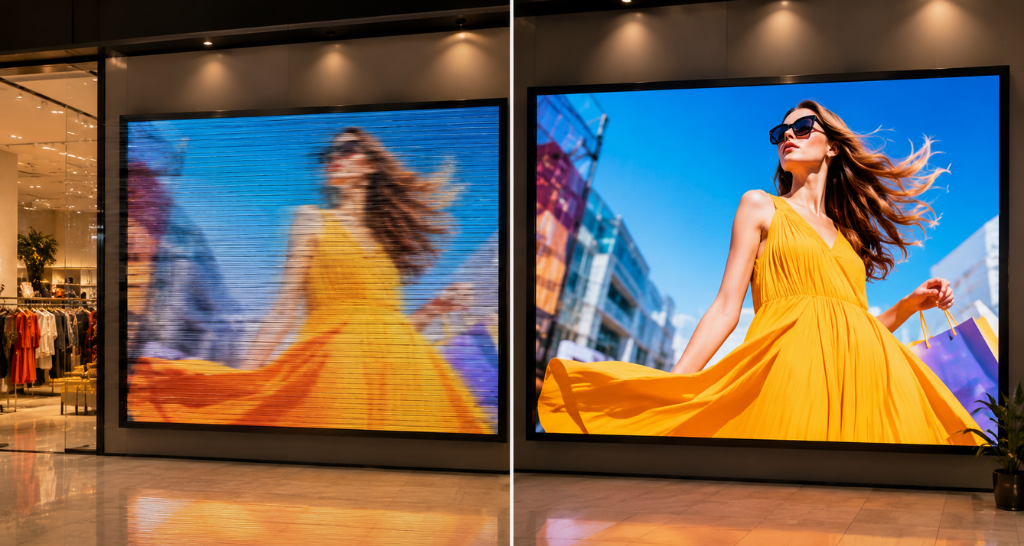
The LED video wall was installed, configured, and ready for use.
The content looked sharp.
The brightness was balanced for the room.
Text was clear even from the back, and videos appeared smooth to everyone standing in front of the screen.
Then someone took out a phone to record it.
Dark bands started moving across the display.
Another camera was tested.
The problem became even more noticeable.
But the moment everyone looked away from the camera and back at the actual LED wall, the screen looked perfectly normal again.
So, was something wrong with the LED Display?
Not necessarily.
The problem was not simply what the LED wall was showing.
It was how quickly the screen was refreshing that image and how the camera was capturing those refresh cycles.
This is where LED Display Refresh Rate becomes important.
Refresh rate is often treated as just another number on an LED video wall specification sheet 1920 Hz, 3840 Hz, or higher.
In reality, it can influence whether moving content looks stable, whether an LED Display performs properly during livestreaming, and whether a perfectly good-looking display suddenly starts showing flicker or rolling bands when recorded.
And as LED video walls move into boardrooms, auditoriums, retail stores, studios, museums, control rooms, and event spaces, this matters more than ever and LED Display.
Because today, an LED wall does not only need to look good to the people standing in front of it.
It also needs to look good through the camera pointed at it.
The LED Wall Looked Perfect Until Someone Opened the Camera
A video wall can have the right pixel pitch, impressive brightness, and high resolution and still perform poorly when content starts moving or a camera points toward it.
That is where refresh rate becomes important and LED Display.
For an LED video wall, refresh rate is not simply another number written on the technical specification sheet.
It affects how consistently the LEDs reproduce an image, how clean moving content appears, how the screen behaves during filming, and whether the display remains visually stable across different applications.
A low or unsuitable LED Display Refresh Rate may not always be obvious while looking at a static image.
The problems often become visible when a presentation changes slides, a ticker moves across the screen, a sports video plays, someone records the wall on a smartphone, or professional cameras are introduced.
This makes refresh rate an important design consideration for corporate spaces, control rooms, auditoriums, retail environments, studios, events, museums, and other commercial installations.
So what exactly is refresh rate doing inside an LED video wall?
And what changes when the specification is too low for the application and LED Display.
What Is Actually Happening When an LED Video Wall Refreshes?
An LED video wall may appear continuously illuminated, but its LEDs are not simply remaining static while content plays.
The display electronics are constantly updating the pixels.
This process happens extremely quickly, which is why the human eye normally sees a stable image rather than individual refresh cycles and LED Display.
The LED Display Refresh Rate represents how frequently that image is refreshed every second and is measured in Hertz or Hz.
For example, specifications such as 1920 Hz and 3840 Hz are commonly encountered in commercial LED systems.
But the important point is not memorising these numbers and LED Display.
It is understanding what those numbers mean for the application.
When refresh performance is appropriate, individual updates blend into a visually continuous image.
When it is not appropriate for the content, camera environment, or application, the display can begin revealing visual problems and LED Display.
This is why refresh rate should be evaluated during the design of LED Video Wall Solutions, not after the screen has already been installed.
What Role Does Refresh Rate Play in an LED Video Wall?
Think about refresh rate as one part of the system responsible for maintaining visual continuity.
An LED wall may be displaying a presentation one moment, fast-moving brand content the next, followed by a live camera feed.
The display has to reproduce those changing visual signals continuously.
The LED Display Refresh Rate influences how frequently the LEDs redraw that information.
This directly matters in four areas:
Visual stability:
The image needs to appear stable instead of producing visible flicker or instability.
Motion reproduction:
Moving graphics, scrolling text, transitions, videos, and live feeds need to remain visually clean.
Camera compatibility:
The LED wall needs to work with cameras without producing distracting bands or flicker in recorded footage.
Application performance:
A screen designed for static signage has different demands from one installed behind a presenter in a broadcast studio.
Refresh rate therefore connects the specification of the LED wall with the way the wall will actually be used.
What Happens When the Refresh Rate Is Too Low?
This is where the importance of refresh rate becomes much clearer.
Suppose two LED walls have the same dimensions and similar resolution.
Both look acceptable while displaying a static corporate logo.
Now play moving graphics on them.
Record them.
Change brightness.
Use them as a background for a livestream.
The difference can become much more noticeable.
An inadequate LED Display Refresh Rate can contribute to several real-world problems.
1. The Screen May Flicker on Camera
This is probably the most recognised refresh-rate problem.
To a person standing in front of the LED wall, everything may look normal.
Open a smartphone camera and suddenly dark bands or flickering may appear.
Why?
The LED wall and camera are operating on different cycles.
The display is refreshing its pixels while the camera is capturing frames using its own frame rate and shutter speed.
If these processes do not interact well, the camera may capture portions of the display’s refresh cycle.
The result can be rolling bands, dark lines, flickering, or inconsistent brightness.
This becomes a serious issue when an Indoor LED Display is used in a boardroom, corporate studio, auditorium, conference centre, showroom, or other space where people frequently record content.
A screen that looks good to the eye but poor through a camera is no longer performing properly for the complete use case.
2. Fast-Moving Content Can Expose Weaknesses
Static content is forgiving.
Motion is not.
Think about an LED wall displaying:
- A fast-moving product video
- Scrolling financial information
- Sports footage
- Animated graphics
- Live event visuals
- News tickers
- Moving text
- Rapid presentation transitions
These applications place greater demands on the display system.
An appropriate LED Display Refresh Rate helps maintain visual consistency while content is changing rapidly.
This matters particularly in environments where information cannot appear visually unstable.
In a control room, for example, operators may continuously monitor dashboards, CCTV feeds, maps, alerts, and live information.
In an auditorium, the same display may switch between presentations, videos, graphics, and live camera feeds.
The refresh requirement should therefore be connected to content behaviour rather than decided only from the screen size.
3. Recorded Content Can Become Difficult to Use
This problem is becoming more important because commercial spaces are now content-production spaces too.
Consider a corporate boardroom.
Originally, the LED wall may have been installed for presentations and video conferencing.
Six months later, the marketing team starts recording leadership videos in the same room.
Then HR uses it for training videos.
Management uses it for town halls.
The communications team livestreams an announcement.
Suddenly the display is no longer being viewed only by people sitting in the room.
It is being viewed through cameras.
If the LED Display Refresh Rate was selected only for basic presentation use, the wall may create problems during filming.
The production team may then need to adjust shutter speeds, reposition cameras, change brightness, or correct footage.
A specification decision made during installation can therefore affect content production long after the project is completed.
Low Refresh Rate vs Appropriate Refresh Rate: What Actually Changes?
The easiest way to understand refresh rate is to compare the user experience.
| Situation | Low / Unsuitable Refresh Rate | Appropriate Refresh Rate |
| Static presentation | May appear acceptable | Stable appearance |
| Moving graphics | Greater chance of visible instability | Cleaner visual reproduction |
| Smartphone recording | Flicker or bands may appear | Better on-camera stability |
| Professional filming | More camera compatibility issues | Better suited to filming environments |
| Livestreaming | Screen artifacts may become visible | More consistent background |
| Fast-moving content | Weaknesses become more noticeable | Better visual continuity |
| Photography | Possible banding depending on camera settings | Lower risk of visible artifacts |
| Long-term flexibility | Limits future camera-based applications | Supports wider use cases |
The key takeaway is simple.
A higher number is not valuable just because it is higher.
The right LED Display Refresh Rate is valuable when it solves a real requirement.
Why 1920 Hz and 3840 Hz Should Not Be Treated as Marketing Numbers?
LED video wall buyers frequently encounter refresh-rate values such as 1920 Hz and 3840 Hz.
It is tempting to compare them the same way we compare storage capacity or screen resolution.
3840 is higher than 1920, so 3840 must always be better.
That is an incomplete way of specifying a video wall.
A 1920 Hz display may be suitable for an installation where direct viewing is the main requirement and filming is limited.
A 3840 Hz LED Display Refresh Rate may make much more sense when cameras regularly interact with the display.
That could include:
- Broadcast studios
- Corporate content studios
- Auditoriums
- Live events
- Conference spaces
- Virtual production environments
- Brand experience centres
- High-end retail environments
- Spaces used for livestreaming
The specification should follow the use case.
Otherwise, one project may be over-specified while another is under-specified.
Refresh Rate Becomes More Important When Cameras Enter the Room
This is one of the biggest changes in how modern LED walls are being used.
A few years ago, a conference room screen might have been used almost entirely for presentations.
Today that same room can host hybrid meetings, webinars, social videos, leadership addresses, online training, product demonstrations, and livestreams.
An auditorium can host both an in-person audience and an online audience.
A retail LED wall can become the background of hundreds of smartphone videos.
A museum installation can be photographed thousands of times.
This changes how LED Display Refresh Rate should be considered.
The screen no longer needs to look good from only one perspective.
It needs to look good to the human eye and through a camera sensor.
Refresh Rate and Outdoor LED Walls
Refresh rate is not limited to indoor installations.
Consider an Outdoor LED Display installed at a stadium, public event, outdoor activation, building façade, or concert.
These screens may regularly appear in:
Live broadcast footage.
News coverage.
Event photography.
Drone videos.
Social media reels.
Audience smartphone recordings.
In these situations, camera performance becomes relevant even though the screen is outdoors.
However, outdoor LED design has additional considerations such as high brightness, weather resistance, heat management, viewing distance, cabinet protection, and serviceability.
Refresh rate is one part of this larger system.
The correct design has to balance all of them.
Is High Refresh Rate Enough to Guarantee a Good LED Wall?
No.
This is where specification-based comparisons can become misleading.
A high LED Display Refresh Rate cannot compensate for every other weakness in an LED system.
The final performance also depends on several connected components.
Driver IC Quality
The driver IC controls the LEDs at module level.
Its performance influences how effectively LEDs are driven, how brightness is managed, and how the display behaves at different operating conditions.
Two LED walls quoting the same refresh rate can therefore behave differently.
Scan Ratio
The way an LED module scans its LEDs also influences display behaviour.
Scan design interacts with driver electronics and can affect camera performance.
LED Controller
The controller manages the visual data being delivered to the display.
Poor configuration can affect the final output even when the LED modules themselves are capable of strong performance.
Video Processor
The processor handles incoming signals, scaling, switching, resolution management, and other processing requirements.
The complete signal chain matters.
This is why selecting LED Video Wall Solutions should involve system-level evaluation rather than comparing LED panel specification sheets alone.
Refresh Rate and Brightness Also Interact
There is another situation buyers often discover only after installation.
The LED wall performs well at one brightness level but behaves differently when brightness is reduced.
This can be connected to the way LED brightness is controlled.
LED systems may use pulse-width modulation, or PWM, to manage output.
Depending on the electronics and configuration, reducing brightness can influence how the screen appears through a camera.
That means testing the LED Display Refresh Rate only at maximum brightness does not always represent actual operating conditions.
A corporate LED wall, for example, may operate at considerably lower brightness than its maximum capability because viewers are sitting close to the screen.
If that room is also used for filming, the display should ideally be evaluated at the brightness levels that will actually be used.
What Does Refresh Rate Mean for Different Applications?
There is no universal requirement for every video wall.
Corporate Meeting Rooms
The screen may begin as a presentation display but later be used for webinars, video conferences, leadership videos, and hybrid meetings.
Camera compatibility should therefore be considered from the beginning.
Control Rooms
The priority is continuous, reliable visualization of live information.
Operators may view CCTV feeds, dashboards, maps, alarms, and operational data for long periods.
Refresh performance must be considered alongside reliability, resolution, redundancy, and 24/7 operation.
Auditoriums
Auditorium LED walls frequently handle presentations, live feeds, videos, stage visuals, and event content.
Professional cameras are also common.
An appropriate LED Display Refresh Rate can therefore be much more important here than for a basic information display.
Retail
Retail LED walls are increasingly visible in social media content.
Customers photograph displays.
Influencers record videos.
Brands film campaigns inside stores.
This makes camera performance part of the customer experience, even when the display was originally installed for advertising.
Studios and Broadcast Spaces
Here, refresh performance becomes critical.
The display is intentionally being viewed through cameras.
Testing should therefore involve the actual production workflow rather than relying only on specification sheets.
Can Refresh Rate Problems Be Fixed After Installation?
Sometimes.
But prevention is better than trying to correct an under-specified system later.
Certain issues may be improved through controller configuration, brightness adjustment, camera shutter settings, firmware changes, or other system-level optimisation.
Other limitations may come from the hardware itself.
That is why technical support matters throughout the life of the installation.
Professional Video Wall AMC Services can help maintain display configuration, identify module inconsistencies, check processing and controller behaviour, and diagnose visual issues that appear over time.
Maintenance is not only about replacing a failed LED module.
For a professional video wall, maintaining consistent visual performance is equally important.
What Should Buyers Ask Before Finalising Refresh Rate?
Instead of asking only “What refresh rate does this LED wall have?”, ask questions connected to actual use.
Will professional cameras regularly film the display?
If yes, camera performance should influence specification and testing.
Will people record the screen using smartphones?
This matters for retail, museums, experience centres, events, showrooms, and corporate spaces.
What type of content will run on the wall?
Static branding and rapidly changing live content do not create identical demands.
At what brightness will the display normally operate?
Test performance at realistic brightness settings rather than maximum brightness alone.
Is 1920 Hz sufficient, or does the application justify 3840 Hz or higher?
The answer should come from application requirements rather than a sales preference.
Can the proposed screen be tested using a camera?
Where possible, yes.
A camera test can reveal practical behaviour that a specification sheet cannot.
The Real Cost of Ignoring Refresh Rate
An unsuitable refresh rate may not stop an LED wall from turning on.
That is exactly why the issue can be missed during procurement.
The wall gets installed.
Static content looks good.
The project is signed off.
Then someone records it.
Or a livestream begins.
Or a major event uses professional cameras.
Only then do rolling bands appear.
Now the organisation has already invested in the screen, structure, processors, cabling, installation, and content system.
Fixing the issue may involve configuration changes, additional testing, camera compromises, or in some cases hardware limitations that cannot easily be removed.
The LED Display Refresh Rate should therefore be treated as an application requirement during design, not as a technical detail to investigate after installation.
A Good LED Wall Should Work Beyond the Specification Sheet
Pixel pitch tells you a lot about viewing distance and image detail.
Brightness tells you whether the screen can remain visible in its environment.
Resolution tells you how much visual information the display can reproduce.
But none of these specifications alone tells you how well the display will behave when motion and cameras become part of the equation.
That is the role refresh rate helps address.
An appropriate LED Display Refresh Rate contributes to stable visuals, cleaner camera capture, better handling of demanding applications, and greater flexibility in how the LED wall can be used over its lifetime.
For a simple information screen, refresh rate may not be the first specification driving the project.
For a corporate studio, auditorium, broadcast environment, event venue, retail experience centre, museum, or any camera-facing installation, it can become one of the most important.
The goal is not to specify the highest number available.
The goal is to specify a display that performs correctly in the environment where it will actually operate.