Which Pixel Pitch Is Best for Auditorium LED Video Walls?
Auditoriums require advanced visual solutions that can deliver clear, immersive, and high-quality viewing experiences for audiences. From corporate presentations and educational seminars to concerts, conferences, and entertainment events, display technology plays an important role in communication and engagement.
Among different display options available today, LED Video Walls have become one of the most preferred choices for auditoriums because they provide high brightness, seamless visuals, excellent contrast, and long operational life. However, selecting the right pixel pitch is one of the most important decisions when installing an LED Video Walls.
Pixel pitch directly affects image sharpness, viewing distance, resolution, and overall audience experience. Choosing the wrong pixel pitch can lead to unclear visuals or unnecessary investment. This guide explains which pixel pitch is best for an auditorium LED setup, how it works, its benefits, components, comparison, and how Vallect helps businesses select the right display solution.
What Is Pixel Pitch in LED Video Walls?
Pixel pitch refers to the distance between two individual LED pixels, measured in millimeters (mm). It determines how close or far viewers can sit while still experiencing sharp and detailed visuals.
For example:
- A P1.2 LED display has a pixel distance of 1.2mm
- A P2.5 LED display has a pixel distance of 2.5mm
- A P4 LED display has a pixel distance of 4mm
A smaller pixel pitch means pixels are placed closer together, creating higher resolution and sharper images. A larger pixel pitch means pixels are spaced farther apart and is suitable for longer viewing distances.
For an auditorium, selecting pixel pitch depends on:
- Screen size
- Audience seating distance
- Content type
- Required image quality
- Installation environment
Why It is Important ?
Auditoriums usually have large audiences sitting at different distances. A display that looks perfect from the front row may not provide the same clarity from the back rows if the pixel pitch is not selected properly and Audio visual integration combines sound and visuals to deliver seamless, immersive AV exp pro. HD.!
A suitable pixel pitch ensures:
Better Image Quality
A lower pixel pitch provides more pixels per square meter, improving image details. This is important for presentations, videos, graphics, and live events and LED Video Walls
Comfortable Viewing Experience
The correct pixel pitch reduces visible pixel gaps and provides smooth visuals without distraction.
Cost Efficiency
Choosing a smaller pixel pitch than required increases the project cost. A balanced selection gives better performance without unnecessary expenses.
Professional Appearance
A high-quality auditorium LED video wall creates a premium environment for visitors, speakers, and event organizers.
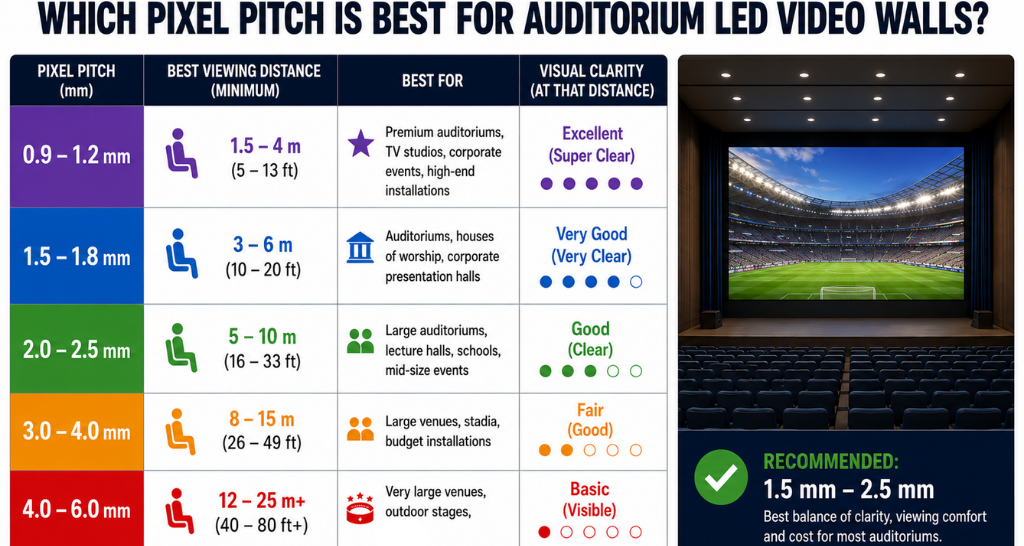
Pixel Pitch Comparison for Auditorium LED Video Walls
| Pixel Pitch | Best Viewing Distance | Suitable Application | Image Quality |
|---|---|---|---|
| P0.9 – P1.5 | 1–5 meters | Premium auditoriums, control rooms, high-end presentations | Ultra HD |
| P1.8 – P2.5 | 3–8 meters | Corporate auditoriums, universities, conference halls | Excellent |
| P3 – P4 | 5–12 meters | Large auditoriums, event spaces | Good |
| P5 and above | 10+ meters | Large venues and distant viewing areas | Standard |
For most modern auditoriums, P1.8 to P2.5 is considered an ideal range because it balances clarity, performance, and budget.
Smaller Pixel Pitch vs Larger Pixel Pitch:
| Comparison | Smaller Pixel Pitch LED Video Walls | Larger Pixel Pitch LED Video Walls |
|---|---|---|
| Resolution | Higher resolution | Lower resolution compared to smaller pitch |
| Visual Quality | More detailed and sharper visuals | Good visuals for long-distance viewing |
| Viewing Distance | Best for close-distance viewing | Best for longer-distance viewing |
| Advantages | ✅ Higher resolution ✅ More detailed visuals ✅ Premium appearance ✅ Better close-distance viewing | ✅ Lower investment cost ✅ Suitable for large screens ✅ Covers large audience areas ✅ Effective for longer distances |
| Disadvantages | ❌ Higher cost ❌ Higher Processing Needs ❌ Higher Setup Cost | ❌ Lower close-range sharpness ❌ Less detailed images ❌ Not ideal for near viewing |
| Suitable For | • Executive auditoriums • Training rooms • Broadcast environments • Premium event spaces | • Large halls • Exhibition areas • Large audience spaces |
Key Components and Technologies :
LED Modules
LED modules are the building blocks of the display. Multiple modules combine to form the complete screen.
LED Cabinet
Cabinets hold multiple modules and provide structural support. They also help with installation and maintenance.
Control System
The control system manages video input, resolution, brightness, and synchronization.
Receiving Cards
Receiving cards distribute signals to individual LED modules for accurate image processing.
Power Supply Units
Power supplies provide stable electricity to maintain consistent display performance.
Cooling System
Large LED Video Walls generate heat during operation. Cooling solutions help maintain temperature and protect internal components.
High Refresh Rate Technology
A high refresh rate ensures smooth motion, especially during videos, live events, and camera recordings.
Value Proposition of Using LED Video Walls in Auditoriums
Superior Visual Experience
LED technology delivers bright, sharp, and immersive visuals for every audience member.
Seamless Large Display
Unlike projector screens, LED Video Walls do not have visible borders or interruptions.
High Brightness
LED displays maintain clear visibility even in rooms with strong lighting.
Long Lifespan
Quality LED displays can operate for thousands of hours with proper maintenance.
Low Maintenance
Modern modular designs allow easy replacement of individual components.
Flexible Screen Sizes
Auditoriums can customize display size according to room design and audience capacity.
Facts and Figures
- Premium LED displays can achieve brightness levels above 800–1500 nits for indoor applications.
- Fine pixel pitch displays can provide resolutions close to traditional high-definition screens.
- LED modules can deliver an operational lifespan of 50,000–100,000 hours.
- Smaller pixel pitch improves viewing comfort for audiences sitting closer to the screen.
- Proper installation can reduce maintenance issues and improve display reliability.
How Lightomated Helps
Selecting the correct display requires technical knowledge, room analysis, and understanding of audience requirements.
Lightomated helps clients with:
Site Evaluation
The team studies auditorium size, viewing distance, lighting conditions, and installation requirements.
Pixel Pitch Selection
Based on audience distance and content usage, Vallect recommends the most suitable pixel pitch.
Complete Installation
From design planning to installation and testing, the complete LED solution is managed professionally.
Customized Display Solutions
Every auditorium has different requirements. Vallect provides solutions according to screen size, budget, and performance expectations.
Reliable Support
Proper maintenance and technical assistance help maintain long-term LED performance.